
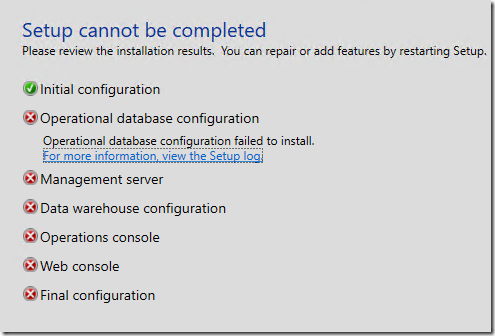
There is a unique issue that blocks SCOM 2022 to SCOM 2025 upgrades.
If you have upgraded your Linux management packs at any time in SCOM 2022, you will likely be impacted. When this fails, it will leave your SCOM management server in an uninstalled state, and you will need to restore that management server from backup or VM snapshot to recover from this!
When the upgrade fails, if you open the log file, you might see the following errors:
[17:28:41]:    Error:    :ImportManagementPack: Error: Unable to load management pack \\server\software\SCOM\2025\RTM\Setup\AMD64\..\..\ManagementPacks\Microsoft.Unix.Library.mp
[17:28:41]:    Error:    :: Verification failed with 7 errors:
-------------------------------------------------------
Error 1:
Found error in 2|Microsoft.Unix.Library|10.22.1330.0|Microsoft.Unix.Library|| with message:
Version 10.25.1005.0 of the management pack is not upgrade compatible with older version 10.22.1330.0. Compatibility check failed with 6 errors:

-------------------------------------------------------
Error 2:
Found error in 1|Microsoft.Unix.Library/31bf3856ad364e35|1.0.0.0|Microsoft.Unix.TimedShellCommand.DataSource|| with message:
DataSourceModuleType: Microsoft.Unix.TimedShellCommand.DataSource exists in current version 10.22.1330.0 of the management pack but does not exist in new version .
-------------------------------------------------------
Error 3:
Found error in 1|Microsoft.Unix.Library/31bf3856ad364e35|1.0.0.0|Microsoft.Unix.ShellCommand.ProbeAction|| with message:
ProbeActionModuleType: Microsoft.Unix.ShellCommand.ProbeAction exists in current version 10.22.1330.0 of the management pack but does not exist in new version .
-------------------------------------------------------
Error 4:
Found error in 1|Microsoft.Unix.Library/31bf3856ad364e35|1.0.0.0|Microsoft.Unix.ShellCommand.MatchesRegExp.TwoState.MonitorType|| with message:
UnitMonitorType: Microsoft.Unix.ShellCommand.MatchesRegExp.TwoState.MonitorType exists in current version 10.22.1330.0 of the management pack but does not exist in new version null.
-------------------------------------------------------
Error 5:
Found error in 1|Microsoft.Unix.Library/31bf3856ad364e35|1.0.0.0|Microsoft.Unix.SSHBased.Cert.Signing.WriteAction|| with message:
Generated XML sample:
<Configuration xmlns:xsi="http://www.w3.org/2001/XMLSchema-instance">
  <Host>Host1</Host>
  <Port>Port1</Port>
  <UserName>UserName1</UserName>
  <Password>Password1</Password>
  <TimeoutSeconds>TimeoutSeconds1</TimeoutSeconds>
  <ValidityYears>ValidityYears1</ValidityYears>
</Configuration>
did not pass schema validation against the new Configuration schema.
: Schema validation failed.
The element 'Configuration' has invalid child element 'ValidityYears'.
-------------------------------------------------------
Error 6:
Found error in 1|Microsoft.Unix.Library/31bf3856ad364e35|1.0.0.0|Microsoft.Unix.SSHBased.Cert.Signing.WriteAction|| with message:
Publicly accessible OverrideableParamter (ValidityYears) has been removed in the newer version of this management pack.
-------------------------------------------------------
Error 7:
Found error in 1|Microsoft.Unix.Library/31bf3856ad364e35|1.0.0.0|Microsoft.Unix.SCXCert.WriteAction|| with message:
Generated XML sample:
<Configuration xmlns:xsi="http://www.w3.org/2001/XMLSchema-instance">
  <Certificate>Certificate1</Certificate>
  <ValidityYears>ValidityYears1</ValidityYears>
</Configuration>
did not pass schema validation against the new Configuration schema.
: Schema validation failed.
The element 'Configuration' has invalid child element 'ValidityYears'.
-------------------------------------------------------


[17:28:44]:    Error:    :ImportManagementPack: Unknown Error. System.ArgumentException : The requested management pack is not valid. See inner exception for details.
Parameter name: managementPack
[17:28:44]:    Error:    :Error:FirstManagementServer: Failed to load MP \\server\software\SCOM\2025\RTM\Setup\AMD64\..\..\ManagementPacks\Microsoft.Unix.Library.mp on retry number 3
[17:28:44]:    Error:    :Error:FirstManagementServer: Gave up trying to load the MP \\server\software\SCOM\2025\RTM\Setup\AMD64\..\..\ManagementPacks\Microsoft.Unix.Library.mp
[17:28:44]:    Error:    :Error:failed to import Server management packs. This is a fatal error
[17:28:44]:    Error:    :FATAL ACTION: ImportManagementPacks
[17:28:44]:    Error:    :FATAL ACTION: DatabaseActions
[17:28:44]:    Error:    :ProcessInstalls: Running the PostProcessDelegate returned false.
[17:28:44]:    Always:    :SetErrorType: Setting VitalFailure. currentInstallItem: Database Configuration
[17:28:44]:    Error:    :ProcessInstalls: Running the PostProcessDelegate for OMDATABASE failed.... This is a fatal item.  Setting rollback.
[17:28:44]:    Info:    :SetProgressScreen: FinishMinorStep.
[17:28:44]:    Always:    :!***** Installing: OMSERVER ***
[17:28:44]:    Info:    :ProcessInstalls: Rollback is set and we are not doing an uninstall so we will stop processing installs
[17:28:44]:    Always:    :****************************************************************
[17:28:44]:    Always:    :****Starting*RollBack*******************************************
[17:28:44]:    Always:    :****************************************************************
This is caused by an updated Linux MP from SCOM 2023 UR3 (or later) that is newer and not upgrade compatible with the Microsoft.Unix.Library.mp that is included in SCOM 2025 RTM.
Please check your Microsoft.Unix.Library.mp (UNIX/Linux Core Library). If it is version 10.22.1330.0 or later, please open a support case with Microsoft and request a private hotfix for this issue. You will be supplied with 10.25.1005.1 version of Microsoft.Unix.Library.mp along with instructions on applying some updates to the SCOM management server and Gateway server roles.
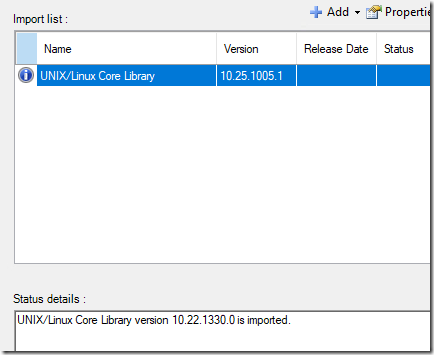
Once you import/upgrade this MP, the SCOM upgrade can continue with success:
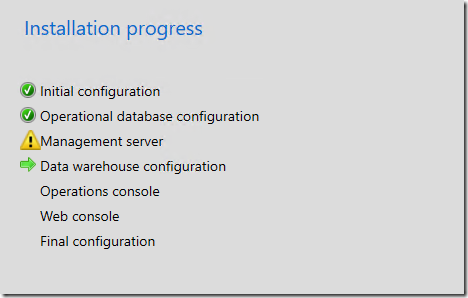
After the upgrade, follow the remainder of the instructions in the private hotfix to ensure you are in a supportable condition after the upgrade.