
When you integrate SCVMM with SCOM, you might see a duplicate SQL server get discovered, for the SQL instance hosting the SCVMM databases:
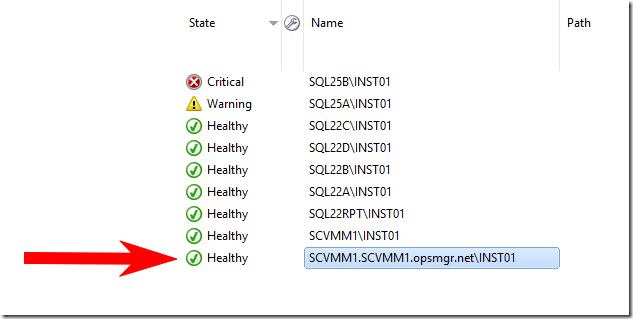
This is an agentless discovered object, and is hosted by the SCOM servers. This causes unwanted alerts originating from the SCOM servers, such as “MSSQL on Windows: Monitoring error”
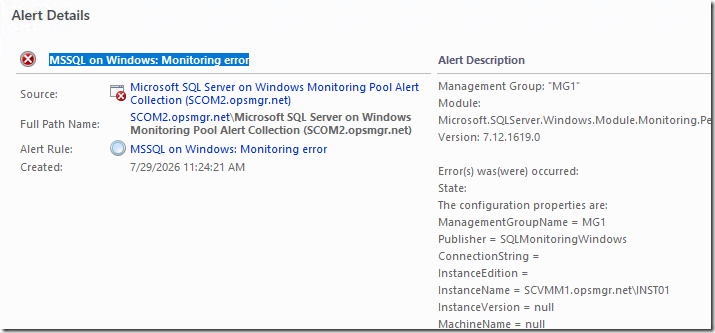
You might also see LOTS of 4221 events in your OperationsManager event log on SCOM servers:
Log Name:      Operations Manager
Source:        SQL Server Discovery MP Windows
Date:          7/29/2026 12:45:01 PM
Event ID:      4221
Task Category: None
Level:         Error
Keywords:      Classic
User:          N/A
Computer:      SCOM1.opsmgr.net
Description:
Management Group: "MG1"
Module: Microsoft.SQLServer.Windows.Module.Discovery.Discoveries.DatabaseDiscovery
Version: 7.12.1619.0

Error(s) was(were) occurred:
State:
The configuration properties are:
ManagementGroupName = MG1
Publisher = SQLDiscoveryWindows
ConnectionString =
InstanceEdition =
InstanceName = SCVMM1.opsmgr.net\INST01
InstanceVersion = null
MachineName = null
MonitoringType = null
NetbiosComputerName = null
Login = null
ConnectionString = null
DatabaseClassId = 00000000-0000-0000-0000-000000000000
DatabaseReferencesUserResourcePoolClassId = 00000000-0000-0000-0000-000000000000
DefaultPoolClassId = 00000000-0000-0000-0000-000000000000
DiscoverySourceManagedEntityId = 00000000-0000-0000-0000-000000000000
DiscoverySourceObjectId = 00000000-0000-0000-0000-000000000000
ExcludeList = null
InstanceName = null
LocalDatabaseClassId = 00000000-0000-0000-0000-000000000000
MachineName = null
SqlExecTimeoutSeconds = 0
SqlTimeoutSeconds = 0
TimeoutSeconds = 0
UserDefinedResourcePoolClassId = 00000000-0000-0000-0000-000000000000
Password = ********

Error(s):

---------- Exception: ----------
Exception Type: System.ArgumentException
Message: Version string portion was too short or too long.
Source: mscorlib
Stack Trace:
   at System.Version.VersionResult.SetFailure(ParseFailureKind failure, String argument)
   at System.Version.TryParseVersion(String version, VersionResult& result)
   at System.Version.Parse(String input)
   at Microsoft.SQLServer.Module.Helper.DataMapping.XmlConfiguration.PropertyRecord.SetValueFromString(Object target, String strValue)
   at Microsoft.SQLServer.Module.Helper.DataMapping.XmlConfiguration.XmlConfigurationMapper.Map(XmlReader configuration, Object target)
   at Microsoft.SQLServer.Module.Helper.Base.ModuleBaseHelper`1.LoadConfiguration(XmlReader configuration)
This is a bug, first fixed in SCVMM 2022 UR3, and SCVMM 2025 UR1.
To resolve this issue:
1. Apply SCVMM 2022 UR3 (or later) or SCVMM 2025 UR1 (or later) to SCVMM
ENSURE you apply the updates for the server, and the admin console components.
Release build versions for System Center Virtual Machine Manager 2022
Release build versions for System Center Virtual Machine Manager 2025
2. Fix the SCVMM Registry
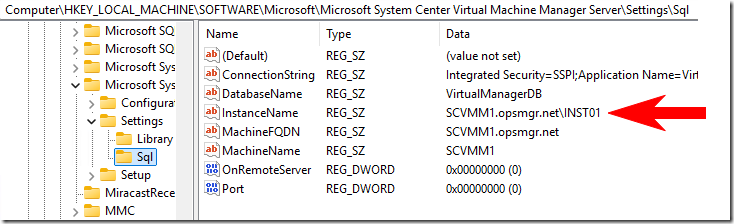
Open the registry to HKLM\SOFTWARE\Microsoft\Microsoft System Center Virtual Machine Manager Server\Settings\Sql
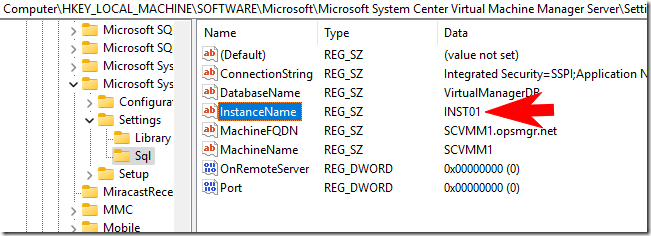
The InstanceName registry string entry is wrong. This should be only “MSSQLSERVER” (for a Default instance), or your custom InstanceName if you are using a named instance.
Here is an example of the wrong one:
After I fix it:
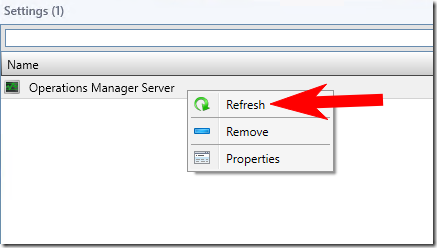
3. Refresh the SCOM connection from SCVMM console:

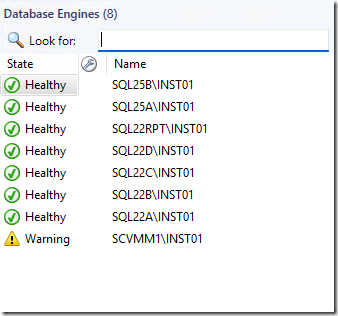
4. Verify the duplicate DB engine is gone:
Thanks this has been annoying for a long time!
Thanks for this, I raised this 2 years ago as a support ticket and never got any feedback before I left the role, just happened to search today to see if it had been resolved!